After dec 21 update all sitemaps disappeared

Hello

On dec 22nd I opened web scraper as usual and I see that all my sitemaps are gone. A day before everything was fine. I'm guessing its because chrome or chrome dev tools update.

Please help

Chrome version: Version 63.0.3239.108 (Official Build) (64-bit)
OS: Windows 7

Sitemap:
{id:"my sitemap"}

1 Like

Can you please post your web scraper version as well?

Web Scraper 0.3.1

Right, so I need 20 characters to post a reply apparently.

Ok so I just checked chrome web store and apparently scraper was updated on December 21, 2017. So the reason is clear. But now what? Will I be able to restore all my sitemaps?

Before we released the upgrade we tested whether the sitemaps would migrate correctly to the new extension. There weren't any problems.

There isn't any auto delete or database cleanup functionality also.

Please do these steps so we can understand the problem:

  1. open chrome://extensions/ or go to manage extensions
  2. enable "developer mode" at the top right
  3. open Web Scrapers "background page"
  4. a new popup window should appear.
  5. go to "Console" tab to check whether there are any errors there. If there are errors paste them here

If there aren't any errors you can check web scrapers storage to see whether the sitemaps are in chrome storage.

  1. go to "Application" tab
  2. Under Storage > IndexedDB there should be a database _pouch_scraper_sitemaps
  3. under _pouch_scraper_sitemaps expand "document-store" there you should see your sitemaps
  4. Do you see your sitemaps there?

Pasting errors.

background_script.js:24 initial configuration i
background_script.js:24 initializing Background Script message listener
background_script.js:24 Uncaught DOMException: Failed to execute 'put' on 'IDBObjectStore': Evaluating the object store's key path did not yield a value.
at IDBRequest.n.openCursor.onsuccess (chrome-extension://jnhgnonknehpejjnehehllkliplmbmhn/background_script.js:24:150938)
background_script.js:24 Failed to open indexedDB, are you in private browsing mode?
_ @ background_script.js:24
background_script.js:24 Uncaught (in promise) n
background_script.js:24 content script error Object {"status":500,"name":"indexed_db_went_bad","message":"unknown","reason":"Failed to open indexedDB, are you in private browsing mode?"}
background_script.js:24 extension usage ended
background_script.js:24 Uncaught (in promise) n

background_script.js:24 content script error Object {"status":500,"name":"indexed_db_went_bad","message":"unknown","reason":"Failed to open indexedDB, are you in private browsing mode?"}
background_script.js:24 Uncaught (in promise) n
background_script.js:24 extension usage ended
background_script.js:24 Uncaught (in promise) n
background_script.js:24 content script error Object {"status":500,"name":"indexed_db_went_bad","message":"unknown","reason":"Failed to open indexedDB, are you in private browsing mode?"}
background_script.js:24 Uncaught (in promise) n
background_script.js:24 content script error Object {"status":500,"name":"indexed_db_went_bad","message":"unknown","reason":"Failed to open indexedDB, are you in private browsing mode?"}
background_script.js:24 Uncaught (in promise) n


I can see sitemap list when I click on 'document-store' and also each individual sitemap under '_pouch_scraper_sitemaps'. And to logs repeated question, no I'm not in private browsing mode.

We tried to replicate the issue without success. Currently it seems that this update has affected only your installation.

We released a 0.3.2 version which introduces a more detailed error messages for database calls and also wouldn't fail if the initial connection somehow fails. We hope that this update fixes the issue for you. That said we didn't make it a full release so you might not get the update immediately.

At the moment you can export the sitemaps from database and import them into another web scraper installation. Here are the steps:

  1. Open chrome://extensions/ or go to manage extensions
  2. Enable “developer mode” at the top right
  3. Open Web Scrapers “background page”
  4. Go to "Console" tab
  5. Copy all of the code from here and paste it into the console
  6. Hit "Enter" to execute the code
  7. Additionally run this code:
var db = new PouchDB('scraper-sitemaps');
db.allDocs({include_docs: true}).then(function(response){

	for(var i in response.rows) {
		var sitemap = response.rows[i].doc;
		delete sitemap._rev;
		console.log(JSON.stringify(sitemap));
	}
});
  1. You should see the sitemaps printed out in the console
  2. Create another user profile in chrome and import sitemaps there.

If you still cannot access sitemaps after getting 0.3.2 version please post here.

1 Like

Thank you so much for all your trouble. So much work would go to waist if those sitemaps would be unrecoverable.

Waited till I got 0.3.2 version. Still cant access sitemaps.

Hello

I tried to complete steps to retrieve sitemaps and after I did 7th step I got error messages in console:

Will sitemaps be deleted if I'll try to remove addon and add again?

If possible could someone share any suggestions? At the moment I cant even export sitemaps with running codes as I get error messages

Try running this script in the console. This script uses native database client instead of pouchdb wrapper.

var version = 5;
var openRequest = window.indexedDB.open("_pouch_scraper-sitemaps", version);
openRequest.onerror = function (event) {
	console.error("Database error: " + JSON.stringify(event));
};
openRequest.onupgradeneeded = function (event) {
	console.error("Database upgrade needed: " + JSON.stringify(event));
};
openRequest.onsuccess = function (event) {
	console.log("connected to database");
	let indexedDb = event.target.result;
	let transaction = indexedDb.transaction(["document-store", "by-sequence"], "readonly");
	let indexStore = transaction.objectStore("document-store");

	console.log("fetching sitemap index");
	let sitemapInfosRequest = indexStore.getAll();

	sitemapInfosRequest.onsuccess = function(event) {

		console.log("fetched sitemap index");
		let sitemapInfos = event.target.result;
		console.log(sitemapInfos);

		let sitemapRevs = [];
		for(let i in sitemapInfos) {
			let sitemapInfo = sitemapInfos[i];
			if(sitemapInfo.deletedOrLocal === "0") {
				sitemapRevs.push(sitemapInfo.winningRev)
			}
		}

		console.log("fetching sitemaps");
		let sitemapStore = transaction.objectStore("by-sequence");
		let sitemapsRequest = sitemapStore.getAll();
		sitemapsRequest.onsuccess = function(event) {

			console.log("fetchied sitemaps");
			let sitemaps = event.target.result;
			console.log(sitemaps);

			for(let i in sitemaps) {
				let sitemap = sitemaps[i];
				let sitemapRev = sitemap._rev;

				if(sitemapRevs.indexOf(sitemapRev) !== -1) {
					delete sitemap._rev;
					delete sitemap._doc_id_rev;
					let sitemapJSON = JSON.stringify(sitemap);
					console.log(sitemapJSON);
				}
			}

		};
		sitemapsRequest.onerror = function (event) {
			console.error("sitemaps error: " + JSON.stringify(event));
		};
	};
	sitemapInfosRequest.onerror = function (event) {
		console.error("sitemap infos error: " + JSON.stringify(event));
	};
};

I appreciate for your spent time on this. Really. After executing latest code it only prints 'connected to database' and after waiting 10+mins nothing happens

I added some additional debug messages to the script. Try running it again.

Ok. I got something now. Not sure how to export/copy sitemaps.

Those are only debug messages. It seems that the matcher script didn't work correctly on your side.

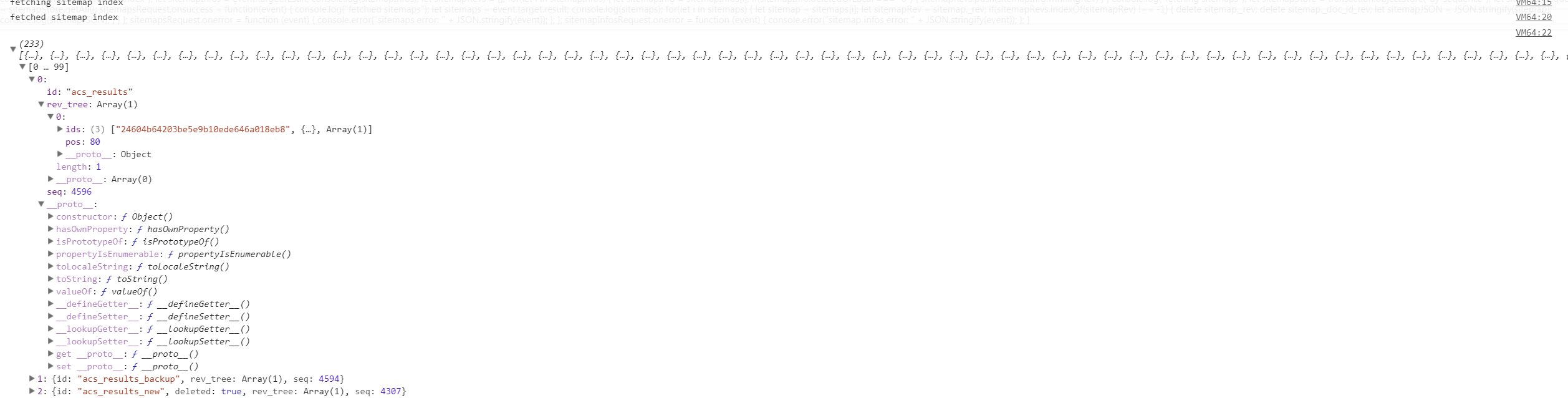
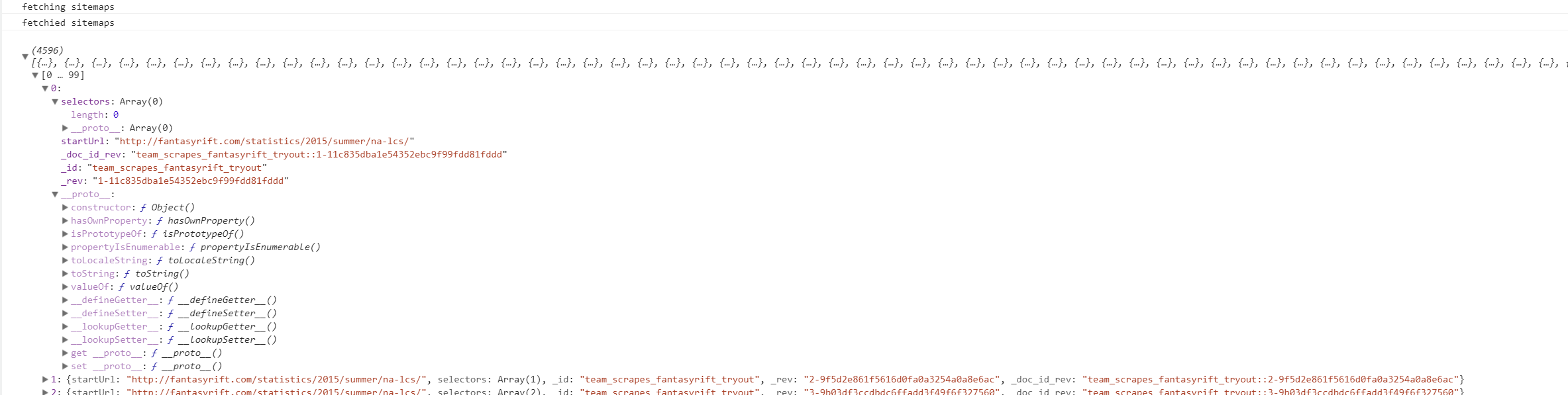
Please expand one record from sitemap index and one from sitemaps. Post a screenshot of those objects here. I'll update the script once again.

From index:

From sitemaps: