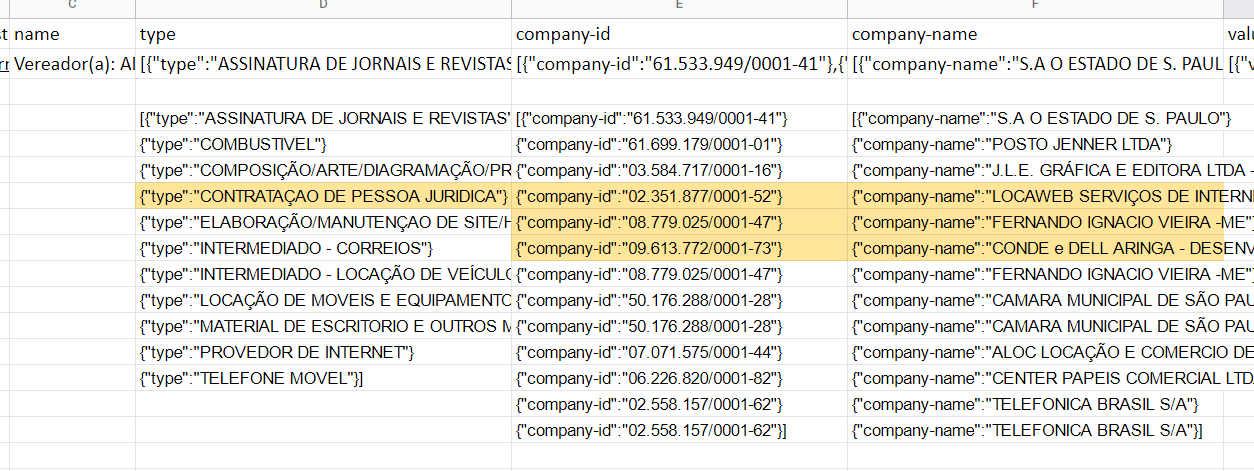
I´m trying to scrape a table that has one of the group values in another row.
Basically, I want to generate a table with the following columns
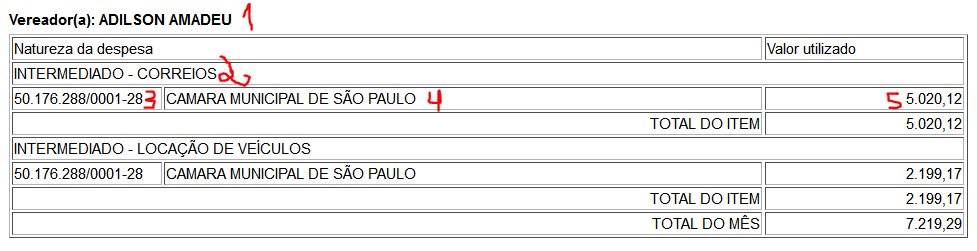
1 - name
2 - type
3 - company id
4 - company name
5 - value
I´m able to generate all but the number 2 "type".
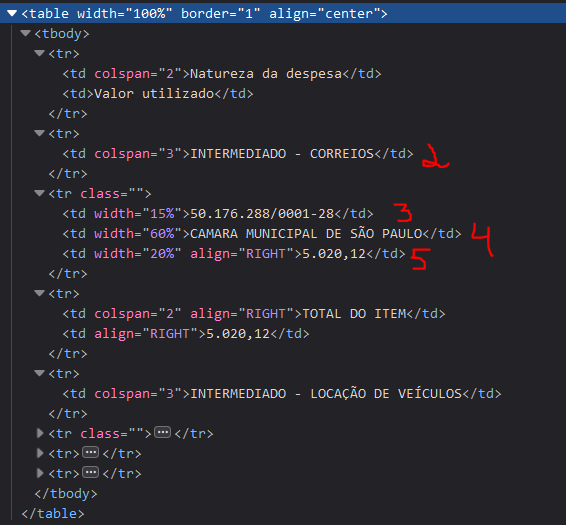
Since it does not have a common parent element, I´m unable to have it scraped in the correct way.
I´m only able to add it as a multiple value and cross-reference with all "company" lines, instead of only the ones beneath it.
Url: https://sisgvarmazenamento.blob.core.windows.net/prd/PublicacaoPortal/Arquivos/201901.htm
Here the HTML structure
Sitemap:
{id:"{"_id":"camara_municipal_sp_gastos","startUrl":["https://sisgvarmazenamento.blob.core.windows.net/prd/PublicacaoPortal/Arquivos/2019[01-12].htm","https://sisgvarmazenamento.blob.core.windows.net/prd/PublicacaoPortal/Arquivos/2020[01-12].htm","https://sisgvarmazenamento.blob.core.windows.net/prd/PublicacaoPortal/Arquivos/2021[01-12].htm","https://sisgvarmazenamento.blob.core.windows.net/prd/PublicacaoPortal/Arquivos/2022[01-03].htm"],"selectors":[{"id":"grup_vereador","parentSelectors":["_root"],"type":"SelectorElement","selector":"table[class='bloco']","multiple":true,"delay":0},{"id":"vereador","parentSelectors":["grup_vereador"],"type":"SelectorText","selector":"b","multiple":false,"delay":0,"regex":"\\s(.*)"},{"id":"fornecedor_cnpj","parentSelectors":["tr_table"],"type":"SelectorText","selector":"td[width='15%']","multiple":false,"delay":0,"regex":""},{"id":"fornecedor_nome","parentSelectors":["tr_table"],"type":"SelectorText","selector":"td[width='60%']","multiple":false,"delay":0,"regex":""},{"id":"fornecedor_valor_utilizado","parentSelectors":["tr_table"],"type":"SelectorText","selector":"td[width='20%']","multiple":false,"delay":0,"regex":""},{"id":"tr_table","parentSelectors":["grup_vereador"],"type":"SelectorElement","selector":"tr:has(> td:nth-child(2)[width=\"60%\"])","multiple":true,"delay":0},{"id":"competencia","parentSelectors":["_root"],"type":"SelectorText","selector":"h3","multiple":false,"delay":0,"regex":"\\d\\d/\\d\\d\\d\\d"}]}"}