
- I'm trying to scrape the web instance of Slack, and is a React app
- I'm trying to scrape get username, phone, Skype name, email (if available)
- Desired content is contained in a hidden side-panel
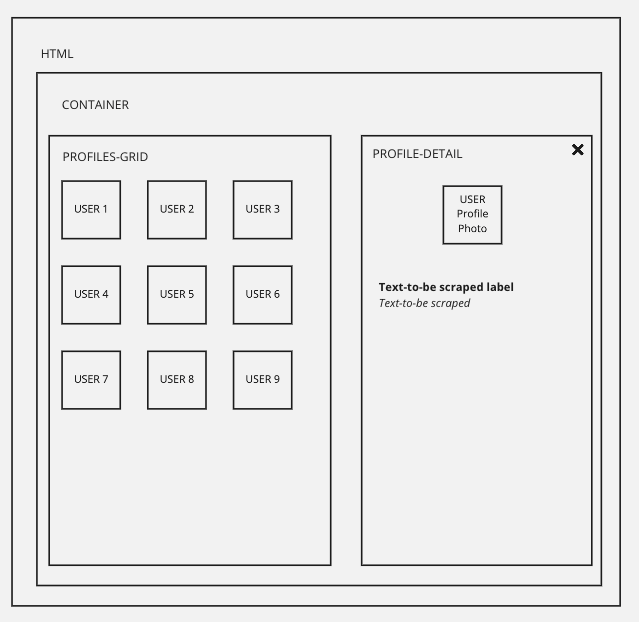
- User profile tiles contain no link tags (click events appear to be attached to and elements)
- Element in user profile tile must be clicked to reveal hidden side-panel
- Content for user profile is dynamically loaded into side-panel
- Side panel is not a child of or sibling of the user profile tile
I can't use "Link" selectors, or can't figure out how to use them. While it will change the address bar when clicked, these HREF's aren't available in the code as far as I can tell. Maybe they are being rewritten using browser history events? When I try attaching an Element Click selector to the tiles in the PROFILES-GRID, it seems to activate and load the PROFILE-DETAIL panel but I am unable to capture the content there. If I try to attach a selector to the PROFILE-DETAIL, I get a message saying that the element is not a child of the selected parent (i.e. "Parent does not contain selected element")
I've added a few attachments:
- actual mockup of interface
- conceptual diagram of DOM element hierarchy
- screenshots of the actual DOM rendered by interface
I can get actual HTML in a subsequent post I think if someone needs it. Please note, the conceptual diagram does not use labels that reflect the actual classes in the HTML.



Url: https://app.slack.com/client/SESSION_ID_GOES_HERE/browse-people
I think to test that, you would have to navigate to a slack instance where you have an account via the website, open "More" in the sidebar, and then select People. Then you could get the SESSION ID from your address bar and insert it into the URL above.
Sitemap:
{"_id":"my-community-slack-instance","startUrl":["https://app.slack.com/client/SESSION_ID_GOES_HERE/browse-people"],"selectors":[{"clickElementSelector":"div.c-select_button","clickElementUniquenessType":"uniqueText","clickType":"clickOnce","delay":0,"discardInitialElements":"do-not-discard","id":"select-drop-down","multiple":false,"parentSelectors":["_root"],"selector":"div.c-search_filter_section div.p-search_filter__select","type":"SelectorElementClick"},{"clickElementSelector":"div.c-select_options_list__option:nth-of-type(n+6) span","clickElementUniquenessType":"uniqueHTMLText","clickType":"clickOnce","delay":200,"discardInitialElements":"do-not-discard","id":"select-deactivated-type","multiple":false,"parentSelectors":["_root"],"selector":"div.c-select_options_list","type":"SelectorElementClick"},{"delay":0,"id":"profiles","multiple":true,"parentSelectors":["_root"],"selector":"div.p-bp__grid_cell:nth-of-type(n+3)","type":"SelectorElement"},{"clickElementSelector":"span.p-browse_page_member_card_entity__name_text","clickElementUniquenessType":"uniqueHTMLText","clickType":"clickOnce","delay":100,"discardInitialElements":"do-not-discard","id":"click-to-open-side-panel","multiple":false,"parentSelectors":["profiles"],"selector":"div.p-browse_page_member","type":"SelectorElementClick"},{"delay":0,"id":"name","multiple":false,"parentSelectors":["profiles"],"regex":"","selector":".p-ia_member_profile__name","type":"SelectorText"},{"delay":0,"id":"phone-data","multiple":false,"parentSelectors":["profiles"],"regex":"","selector":"div.p-ia_member_profile__fields","type":"SelectorText"}]}