Scraping an Angular.js site

Hi forum,

i try to scrape and navigate through an site that is build on angular.js and really, I am nowhere near of success.
I need to scrape car data. I got all the start urls for the brands we find here:

So one start URL for example (for the brand Audi) ist that:

There its starts. FIrst on the top right, we have button "Alle". TO get all the Audi models, we need to clkick that button to show all models.

When we click the first model in Audi:
100 C1 Coupe (817)
01.1970 - 12.1976

we land in a page with all the submodels. For that parent model we have 2 submodels.
Next we need to click into each submodel. Inside there we find a box on the left side "Technische Daten"
From that box we nedd:
Fahrzeugtyp
Baujahr
Leistung
Hubraum
Aufbauart
Antriebsart
Motorart
Motorcodes

Then art the top of that box we can switch by clicking the two cars icon. From the dataset there we need:
TecDoc Typ Nr.:
KBA Nummern

thats the datae we need. AFter that we need to paginate back and click into the next submodel... and so on..

I cant give any sitemap example here, as i am struggling max. I had nothing worked.

Is there a chance to scrape these data with webscraper?
If yes and anybody want to create the working sitemap I willpost a job offer.

Thnaks for checking,
Sirc

Hi,

Please check if this works for you

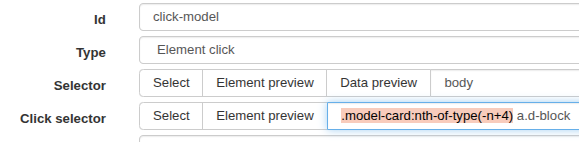
{"_id":"tecalliance","startUrl":["https://web.tecalliance.net/ate/de/parts/cars/5/models?skipHistory=true&suppressAutoSelection=true#@brc/brands:Auto;targetType:cars;skipHistory:true;suppressAutoSelection:true/models:AUDI;targetType:cars;manufacturerId:5;skipHistory:true;suppressAutoSelection:true"],"selectors":[{"clickActionType":"real","clickElementSelector":"[aria-label=\"Alle\"]","clickElementUniquenessType":"uniqueText","clickType":"clickOnce","delay":2000,"discardInitialElements":"discard-when-click-element-exists","id":"click-alle","multiple":true,"parentSelectors":["_root"],"selector":"body","type":"SelectorElementClick"},{"clickActionType":"real","clickElementSelector":"div.ag-cell-value[col-id='typeNumber']","clickElementUniquenessType":"uniqueCSSSelector","clickType":"clickOnce","delay":3000,"discardInitialElements":"discard-when-click-element-exists","id":"click-sub-model","multiple":true,"parentSelectors":["click-model"],"selector":"_parent_","type":"SelectorElementClick"},{"id":"Fahrzeugtyp","multiple":false,"multipleType":"singleColumn","parentSelectors":["click-sub-model"],"regex":"","selector":"tr:contains('Fahrzeugtyp') td","type":"SelectorText"},{"id":"Baujahr","multiple":false,"multipleType":"singleColumn","parentSelectors":["click-sub-model"],"regex":"","selector":"tr:contains('Baujahr') td","type":"SelectorText"},{"id":"Leistung","multiple":false,"multipleType":"singleColumn","parentSelectors":["click-sub-model"],"regex":"","selector":"tr:contains('Leistung') td","type":"SelectorText"},{"id":"TecDoc Typ Nr","multiple":false,"multipleType":"singleColumn","parentSelectors":["click-sub-model"],"regex":"","selector":"tr:contains('TecDoc Typ Nr.:') td","type":"SelectorText"},{"id":"KBA Nummern","multiple":false,"multipleType":"singleColumn","parentSelectors":["click-sub-model"],"regex":"","selector":"tr:contains('KBA Nummern') td","type":"SelectorText"},{"clickActionType":"real","clickElementSelector":"li:nth-of-type(7) span","clickElementUniquenessType":"uniqueCSSSelector","clickType":"clickOnce","delay":1000,"discardInitialElements":"do-not-discard","id":"back-to-sub-models","multiple":true,"parentSelectors":["click-sub-model"],"selector":"_parent_","type":"SelectorElementClick"},{"clickActionType":"real","clickElementSelector":".model-card:nth-of-type(-n+4) a.d-block","clickElementUniquenessType":"uniqueText","clickType":"clickOnce","delay":2000,"discardInitialElements":"discard-when-click-element-exists","id":"click-model","multiple":true,"parentSelectors":["_root"],"selector":"body","type":"SelectorElementClick"},{"clickActionType":"real","clickElementSelector":"li:nth-of-type(5) span.p-menuitem-text","clickElementUniquenessType":"uniqueText","clickType":"clickOnce","delay":1000,"discardInitialElements":"do-not-discard","id":"back-to-model","multiple":true,"parentSelectors":["click-model"],"selector":"_parent_","type":"SelectorElementClick"}]}

I have limited the model clicks to 3 for testing purposes. You can remove the highlighted part to run the full scrape.
image

1 Like

Hi JanAp,

thanks for this . I am gonna test today and get back to you.
If we get this one running 100% I will reward you.

Tested now, mostly working.

*But for example this starz url (Volkswagen):

Here inside that start URL nothing gets scaped/no data in export, but it opends the submodels accuratly.
I cant see any issues or why this is here.

Hm, it dos not extract anymore data after ~88 lines/submodels in csv. It keeps opening more and more submodel and start urls, but no more entries get generated inside data

Just tested the records up to 'C', scraping worked fine, more than 200 records returned.

Few things:

  1. Make sure that the scraping window is maximised at all times, since the layout of the website changes when the window is small.
  2. Clear cookies and browser cache before scraping.

Since the navigation is controlled by JavaScript, it is possible that your computer’s memory may become overwhelmed by the data at some point.

Thanks for your feedback.
The first 3 car makes are fine. I found out that the problem starts with big makes (like Audi, Volvo, Volkswagen...) where a lot of data gets scaped. I tried these 3 makes seperatly, but when the scraping is finished, no data gets exported, like it did not scrape anything.
Is there a function to save data after lets say 100 data sets / submodels scraped?

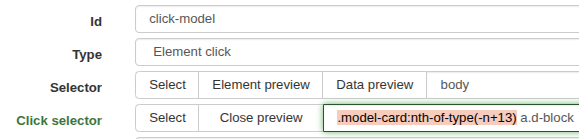
Yes, you can split the scraping into batches by limiting the click-model selector:

image

For instance:
First batch with the click selector: .model-card:nth-of-type(-n+13) a.d-block
Second batch: .model-card:nth-of-type(n+14):nth-of-type(-n+25) a.d-block
Third batch: .model-card:nth-of-type(n+26):nth-of-type(-n+38) a.d-block

And so forth.

this seem to work. Its a lot of work but at least job get done.
Its strange, why is that? Does my ram getting flooded?