Pagination scraping problem

Hello everyone,
Currently I'm trying to do pagination, for normal website it work like a charm but for this website, it just go very random page and go to random link and scrape data without order. Any idea what this is?
Thank you.

Url: Company Listings - Singapore Business Directory

Sitemap:
{"_id":"singapore_timesbusinessdirectory_generalbusiness","startUrl":["https://www.timesbusinessdirectory.com/company-listings?page=[1-20]"],"selectors":[{"id":"company","parentSelectors":["_root"],"type":"SelectorLink","selector":"h3 a","multiple":true,"delay":0},{"id":"phone","parentSelectors":["company"],"type":"SelectorText","selector":".valuephone a","multiple":false,"delay":0,"regex":""},{"id":"email","parentSelectors":["company"],"type":"SelectorHTML","selector":"a#iconCompanyEmail","multiple":false,"regex":"[\\'\\\"][a-zA-Z0-9-_.]+\\@[a-zA-Z0-9-_]+\\.(\\w+.){1,2}[\\'\\\"]","delay":0},{"id":"website","parentSelectors":["company"],"type":"SelectorElementAttribute","selector":".valuewebsite a","multiple":false,"delay":0,"extractAttribute":"href"},{"id":"email_test","parentSelectors":["company"],"type":"SelectorHTML","selector":"a#iconCompanyEmail","multiple":false,"regex":"[a-zA-Z0-9-_.]+\\@[a-zA-Z0-9-_]+(\\.\\w+){1,2}","delay":0},{"id":"contact_individual","parentSelectors":["company"],"type":"SelectorText","selector":"p:nth-of-type(2)","multiple":false,"delay":0,"regex":""},{"id":"categories","parentSelectors":["company"],"type":"SelectorText","selector":"div:nth-of-type(6) div.company-description","multiple":false,"delay":0,"regex":""}]}

@jakelee Hi, please, paste the sitemap JSON code and apply the preformatted text option, otherwise, it is not valid.

@ViestursWS Done, thankyou for remind. About the problem, can you help me with this? :slightly_smiling_face:

@jakelee Hi. The scraper traverses pages in pseudo-random order, the order of records in the scraped data will not correspond to the order of start URLs for the sitemap and may change when new start URLs are added - unfortunately, it is currently not possible to change this behavior.

You can sort the scraped data by the 'web-scraper-order' column.

@ViestursWS I see, but as I run around 20 to 50 pages, the process just stopped and exit prematurely, I don't know why, can you please take a look further?
For example, each page contains 10 items per page, but in the end of 50 pages, it only registered 200 or 100, despite I put the delay quite long, it don't work as much as I expected.

@jakelee Have you run a duplicate test? Please, note that in case the same product re-appears on another page, the product link will not be visited and discarded.

1 Like

@ViestursWS Can you please guide me through this test? Thank you.

@jakelee Simply scrape all of the available links without navigating into the details by using the following sitemap:

{"_id":"singapore_timesbusinessdirectory_generalbusiness-test","startUrl":["https://www.timesbusinessdirectory.com/company-listings?page=[1-20]"],"selectors":[{"delay":0,"id":"company","multiple":true,"parentSelectors":["_root"],"selector":"h3 a","type":"SelectorLink"}]}

Paste the extracted URLs in a deduplicator: Remove Duplicates From List of Lines

In this case, however, it appears that it happens due to inconsistencies(page structure is slightly different starting from the 12 th page) in the structure of the targeted website, thus you will have to create an additional 'company' selector. You can test that by pressing the 'Element preview' button.

{"_id":"singapore_timesbusinessdirectory_generalbusiness-test-2","startUrl":["https://www.timesbusinessdirectory.com/company-listings?page=[1-20]"],"selectors":[{"delay":0,"id":"company","multiple":true,"parentSelectors":["_root"],"selector":"h3 a, p a","type":"SelectorLink"}]}

@ViestursWS Hi,
1st test: 1 duplicate in 102 total

2nd test: 77 removed in 277 total

by creating additional 'company' selector, it will look like this? 2 parents with same child for each one?
Edit: I haven't add child for second 'company' selector yet, just for demonstration.

{"_id":"singapore_timesbusinessdirectory_generalbusiness","startUrl":["https://www.timesbusinessdirectory.com/company-listings?page=[1-20]"],"selectors":[{"id":"company","parentSelectors":["_root"],"type":"SelectorLink","selector":"h3 a","multiple":true,"delay":0},{"id":"phone","parentSelectors":["company"],"type":"SelectorText","selector":".valuephone a","multiple":false,"delay":0,"regex":""},{"id":"email","parentSelectors":["company"],"type":"SelectorHTML","selector":"a#iconCompanyEmail","multiple":false,"regex":"[\\'\\\"][a-zA-Z0-9-_.]+\\@[a-zA-Z0-9-_]+\\.(\\w+.){1,2}[\\'\\\"]","delay":0},{"id":"website","parentSelectors":["company"],"type":"SelectorElementAttribute","selector":".valuewebsite a","multiple":false,"delay":0,"extractAttribute":"href"},{"id":"email_test","parentSelectors":["company"],"type":"SelectorHTML","selector":"a#iconCompanyEmail","multiple":false,"regex":"[a-zA-Z0-9-_.]+\\@[a-zA-Z0-9-_]+(\\.\\w+){1,2}","delay":0},{"id":"contact_individual","parentSelectors":["company"],"type":"SelectorText","selector":"p:nth-of-type(2)","multiple":false,"delay":0,"regex":""},{"id":"categories","parentSelectors":["company"],"type":"SelectorText","selector":"div:nth-of-type(6) div.company-description","multiple":false,"delay":0,"regex":""},{"id":"company-2","parentSelectors":["_root"],"type":"SelectorLink","selector":"p a","multiple":true,"delay":0}]}

@jakelee No, you can simply use it as a single selector - just divided by a comma. The scraper will use the 2nd option only after navigating to 12 th page.

1 Like

@ViestursWS Thank you for the help, in the future, as I add more page range. If the website change more and more, how can I know that? Do you know any way to detect that?

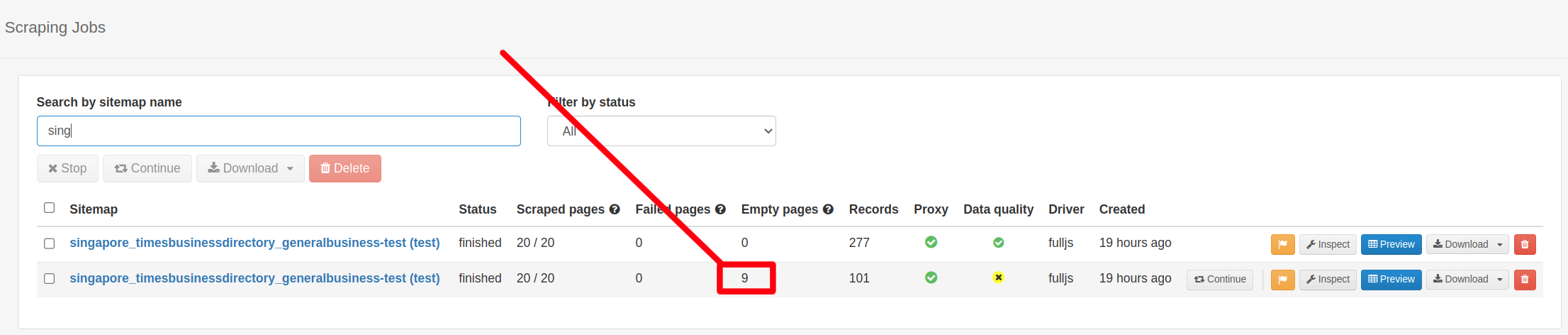
@jakelee Unfortunately, the Web Scraper extension does not have a functionality that would display the number of 'Empty' or 'Failed' pages(which might occur due to the blockage from CAPTCHA, structural inconsistencies, etc.).

The only way to test it would require using Web Scraper Cloud.

1 Like