Pagination Problem on Eventbrite

Describe the problem.

I have created a sitemap to scrape event data from eventbrite but pagination is not working. Scraper Finished job after scraping the first page. Please help

Url: https://www.eventbrite.com/d/united-states/african-american/?page=1&end_date=2020-01-31&start_date=2019-01-01

Sitemap:
{"_id":"eventbrite","startUrl":["https://www.eventbrite.com/d/united-states/african-american/?page=1&end_date=2020-01-31&start_date=2019-01-01"],"selectors":[{"id":"links","type":"SelectorLink","parentSelectors":["_root","pagination"],"selector":"section.eds-l-pad-all-6 div.eds-media-card-content__primary-content a.eds-media-card-content__action-link","multiple":true,"delay":0},{"id":"Date/Time/Location","type":"SelectorText","parentSelectors":["links"],"selector":"div.g-group div.event-details","multiple":false,"regex":"","delay":0},{"id":"Long Description","type":"SelectorText","parentSelectors":["links"],"selector":"div.listing-info__body div.g-group div.g-cell.g-cell-1-1","multiple":false,"regex":"","delay":0},{"id":"pagination","type":"SelectorLink","parentSelectors":["_root","links"],"selector":"a.eds-btn","multiple":true,"delay":0}]}

Same issue as before. Since the link doesn't change, this is a good indicator you're using Element Click Selector to do your pagination.

I added some more selectors to parse out location, city, state and zipcode but it looks like a few of the selectors don't always align. Either way it will get you everything you want.

Note: this selector will go through every page change BEFORE it starts scraping.

{"_id":"forum-pagination-not-working-eventbrite","startUrl":["https://www.eventbrite.com/d/united-states/african-american/?page=1&end_date=2020-01-31&start_date=2019-01-01"],"selectors":[{"id":"links","type":"SelectorLink","parentSelectors":["pagination"],"selector":"div.eds-media-card-content__primary-content a.eds-media-card-content__action-link","multiple":false,"delay":0},{"id":"Date/Time/Location","type":"SelectorText","parentSelectors":["links"],"selector":"div.g-group div.event-details","multiple":false,"regex":"","delay":0},{"id":"Long Description","type":"SelectorText","parentSelectors":["links"],"selector":"div.listing-info__body div.g-group div.g-cell.g-cell-1-1","multiple":false,"regex":"","delay":0},{"id":"pagination","type":"SelectorElementClick","parentSelectors":["_root"],"selector":"div.search-event-card-wrapper","multiple":true,"delay":0,"clickElementSelector":"a:contains(\"Next\")","clickType":"clickMore","discardInitialElements":false,"clickElementUniquenessType":"uniqueCSSSelector"},{"id":"Data//Time","type":"SelectorText","parentSelectors":["links"],"selector":"div.g-group div.event-details time.clrfix p","multiple":true,"regex":"","delay":0},{"id":"Address","type":"SelectorText","parentSelectors":["links"],"selector":"div.g-group div.event-details div.event-details__data > p:nth-of-type(2)","multiple":false,"regex":"","delay":0},{"id":"State","type":"SelectorText","parentSelectors":["links"],"selector":"div.g-group div.event-details div.event-details__data > p:contains(\",\")","multiple":false,"regex":"([A-Z]{2})","delay":0},{"id":"Zipcode","type":"SelectorText","parentSelectors":["links"],"selector":"div.g-group div.event-details div.event-details__data > p:contains(\",\")","multiple":false,"regex":"(\\d{5})$","delay":0},{"id":"City","type":"SelectorText","parentSelectors":["links"],"selector":"div.g-group div.event-details div.event-details__data > p:contains(\",\")","multiple":false,"regex":"^(.+?),","delay":0}]}
1 Like

Thanks for your help, I really appreciate. I also want to scrape Event Start Date, End Date, Start Time, End time, Event Start Time Mode(AM/PM) and Event End Time mode in separate columns. Can you help with this?

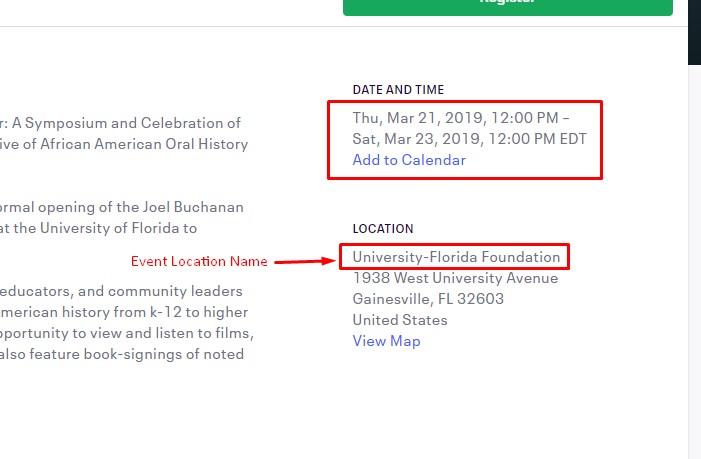
Also, I want to collect Event Location Name too. Please check screenshot
And Can you tell me how to create sitemap as you did? I tried searching but could not find any video. There are only a few videos on the official website. Thank you very much.

Hi -

Sorry but I don't work for Webscraper.io. I just help out on the forum from time to time but I'm not that advanced.
All you need to do is add text selectors for the information you want.

Try this, it's not 100% because some pages are formatted differently and I'm using Regex to select the info you want.

{"_id":"forum-pagination-not-working-eventbrite","startUrl":["https://www.eventbrite.com/d/united-states/african-american/?page=1&end_date=2020-01-31&start_date=2019-01-01"],"selectors":[{"id":"links","type":"SelectorLink","parentSelectors":["pagination"],"selector":"div.eds-media-card-content__primary-content a.eds-media-card-content__action-link","multiple":false,"delay":0},{"id":"Long Description","type":"SelectorText","parentSelectors":["links"],"selector":"div.listing-info__body div.g-group div.g-cell.g-cell-1-1","multiple":false,"regex":"","delay":0},{"id":"pagination","type":"SelectorElementClick","parentSelectors":["_root"],"selector":"div.search-event-card-wrapper","multiple":true,"delay":0,"clickElementSelector":"a:contains(\"Next\")","clickType":"clickMore","discardInitialElements":false,"clickElementUniquenessType":"uniqueCSSSelector"},{"id":"Address","type":"SelectorText","parentSelectors":["links"],"selector":"div.g-group div.event-details div.event-details__data > p:nth-of-type(2)","multiple":false,"regex":"","delay":0},{"id":"State","type":"SelectorText","parentSelectors":["links"],"selector":"div.g-group div.event-details div.event-details__data > p:contains(\",\")","multiple":false,"regex":"([A-Z]{2})","delay":0},{"id":"Zipcode","type":"SelectorText","parentSelectors":["links"],"selector":"div.g-group div.event-details div.event-details__data > p:contains(\",\")","multiple":false,"regex":"(\\d{5})$","delay":0},{"id":"City","type":"SelectorText","parentSelectors":["links"],"selector":"div.g-group div.event-details div.event-details__data > p:contains(\",\")","multiple":false,"regex":"^(.+?),","delay":0},{"id":"Location Name","type":"SelectorText","parentSelectors":["links"],"selector":"div.g-group div.event-details div.event-details__data > p:nth-of-type(1)","multiple":false,"regex":"","delay":0},{"id":"Start Date","type":"SelectorText","parentSelectors":["links"],"selector":"div.g-group div.event-details time.clrfix p","multiple":false,"regex":"([^–]+)","delay":0},{"id":"Start Time ","type":"SelectorText","parentSelectors":["links"],"selector":"div.g-group div.event-details time.clrfix p:nth-of-type(2)","multiple":false,"regex":"([^–]+)","delay":0},{"id":"End TIme","type":"SelectorText","parentSelectors":["links"],"selector":"div.g-group div.event-details time.clrfix p:nth-of-type(2)","multiple":false,"regex":"([^–]+$)","delay":0}]}

1 Like

Ok, Thank you. I will try to find solution in documentation.