Pagination doesn't work

Hi everyone!
Good Day!

I tried to scrape in this site: https://www.mysapl.org/Events-News/Events-Calendar and it works well aside from the pagination in which it clicks but it doesn't load the next page.
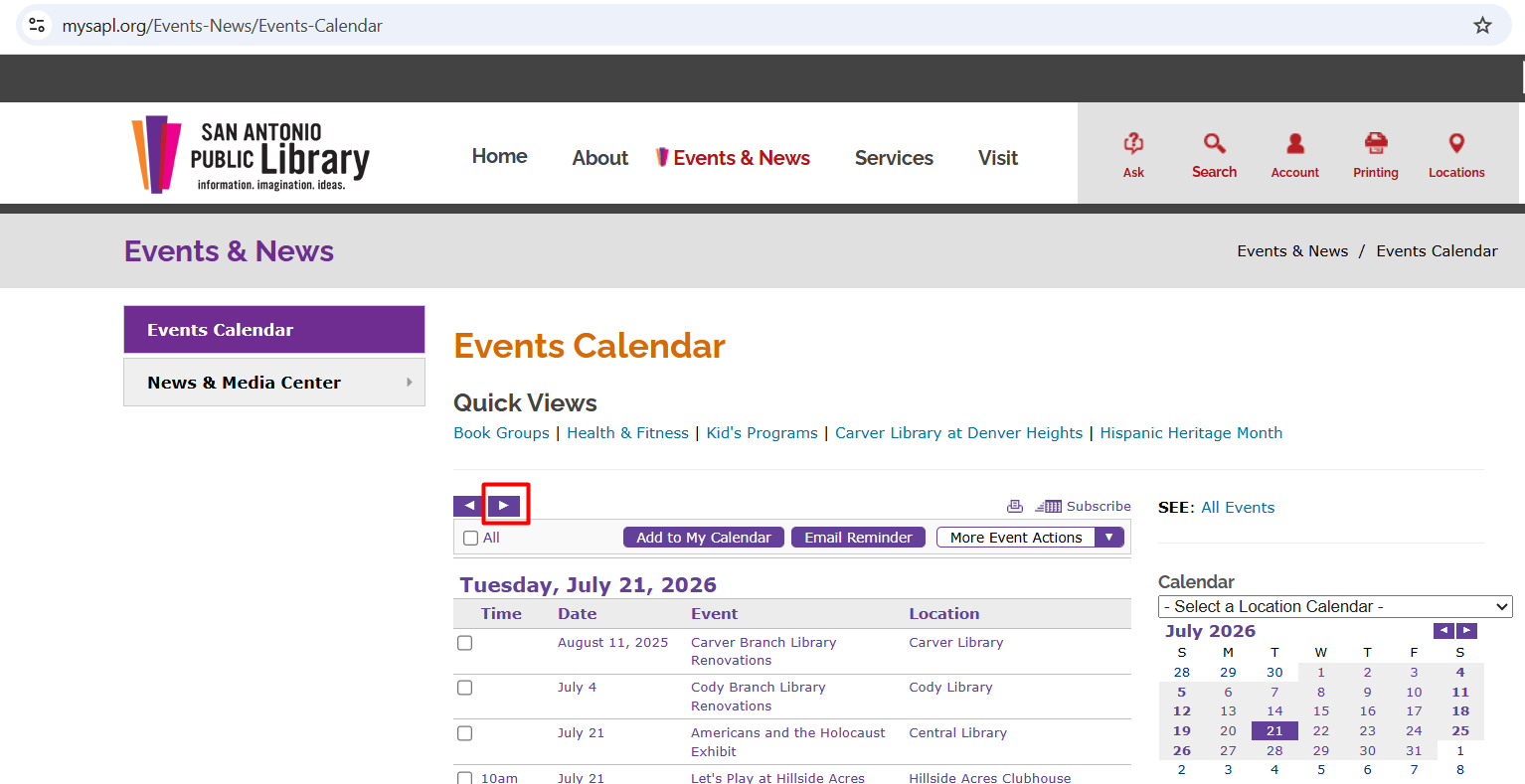
Here's the sitemap:

{"_id":"Events-Lib-MYSAPL-Mano2x","startUrl":["https://www.mysapl.org/Events-News/Events-Calendar"],"selectors":[{"id":"Event Name","multipleType":"singleColumn","parentSelectors":["Event Link","Event Link 2"],"selector":"iframe:iframe form#Form1 SPAN.twEDDescription","type":"SelectorText","version":2},{"id":"Event Contact Name","multipleType":"singleColumn","parentSelectors":["Event Link","Event Link 2"],"selector":"iframe:iframe form#Form1 TABLE.twEDContent TD.twEDContentCell TABLE.twFieldsTable Th:contains('Staff Contact Name') + TD.twEDValue","type":"SelectorText","version":2},{"id":"Event Contact Email","multipleType":"singleColumn","parentSelectors":["Event Link","Event Link 2"],"selector":"iframe:iframe form#Form1 TABLE.twEDContent TD.twEDContentCell TABLE.twFieldsTable Th:contains('Staff Contact Number/Email') + TD.twEDValue a","type":"SelectorText","version":2},{"id":"Event Date","multipleType":"singleColumn","parentSelectors":["Event Link","Event Link 2"],"selector":"iframe:iframe form#Form1 span.twEDStartEndRange","type":"SelectorText","version":2},{"id":"Event City and State","multipleType":"singleColumn","parentSelectors":["Event Link","Event Link 2"],"selector":"iframe:iframe form#Form1 TABLE.twEDContent TD.twEDContentCell TABLE.twFieldsTable TR:nth-of-type(1) TD.twEDValue","type":"SelectorText","version":2},{"id":"Event Description","multipleType":"singleColumn","parentSelectors":["Event Link","Event Link 2"],"selector":"iframe:iframe form#Form1 TABLE.twEDContent TD.twEDContentCell TABLE.twFieldsTable Th:contains('Additional Info') + TD.twEDValue","type":"SelectorText","version":2},{"id":"Event Category","multipleType":"singleColumn","parentSelectors":["Event Link","Event Link 2"],"selector":"iframe:iframe form#Form1 TABLE.twEDContent TD.twEDContentCell TABLE.twFieldsTable Th:contains('Event Type') + TD.twEDValue","type":"SelectorText","version":2},{"id":"Event City and State 2","multipleType":"singleColumn","parentSelectors":["Event Link","Event Link 2"],"selector":"iframe:iframe form#Form1 TABLE.twEDContent TD.twEDContentCell TABLE.twFieldsTable TR:nth-of-type(2) TD.twEDValue","type":"SelectorText","version":2},{"id":"Event Description 2","multipleType":"singleColumn","parentSelectors":["Event Link","Event Link 2"],"selector":"iframe:iframe form#Form1 TABLE.twEDContent DIV.twEDNotes","type":"SelectorText","version":2},{"clickActionType":"real","clickElementSelector":"iframe:iframe DIV.twSimpleTablePagingLine SPAN.twPagerGroup A:nth-of-type(2)","clickElementUniquenessType":"uniqueCSSSelector","clickType":"clickOnce","delay":3500,"discardInitialElements":"do-not-discard","id":"Pagination","multiple":true,"parentSelectors":["_root"],"selector":"iframe:iframe body","type":"SelectorElementClick"},{"id":"Event Link","linkType":"linkFromHref","multiple":true,"parentSelectors":["_root"],"selector":"iframe:iframe form#Form1 TABLE.twSimpleTableTable TR TH a","type":"SelectorLink","version":2},{"id":"Event Link 2","linkType":"linkFromHref","multiple":true,"parentSelectors":["_root"],"selector":"iframe:iframe form#Form1 TABLE.twSimpleTableTable TR TD .twRyoEventCellRight .twDescription a","type":"SelectorLink","version":2}]}

I tried Pagination and Element Click type selector but it doesn't work.
Hi,

I checked the page and, unfortunately, it looks like automated pagination will not be possible due to the website's mechanics.

@JanAp thank you for your quick reply.

I just try to ask if any of you have a solutions regarding this scenario.

I will accept that I will manually click the pagination button in order to view the other pages.

Maybe the javascript that they are using in this pagination button relies on physical mouse clicks and not just script clicks.

Actually, good news. The pagination appears to work in Firefox.

You can try this setup:

{"_id":"Events-Lib-MYSAPL-Mano2x","startUrl":["https://www.mysapl.org/Events-News/Events-Calendar"],"selectors":[{"id":"Event Name","multiple":false,"parentSelectors":["Event Link","Event Link 2"],"regex":"","selector":"iframe:iframe form#Form1 SPAN.twEDDescription","type":"SelectorText"},{"id":"Event Contact Name","multiple":false,"parentSelectors":["Event Link","Event Link 2"],"regex":"","selector":"iframe:iframe form#Form1 TABLE.twEDContent TD.twEDContentCell TABLE.twFieldsTable Th:contains('Staff Contact Name') + TD.twEDValue","type":"SelectorText"},{"id":"Event Contact Email","multiple":false,"parentSelectors":["Event Link","Event Link 2"],"regex":"","selector":"iframe:iframe form#Form1 TABLE.twEDContent TD.twEDContentCell TABLE.twFieldsTable Th:contains('Staff Contact Number/Email') + TD.twEDValue a","type":"SelectorText"},{"id":"Event Date","multiple":false,"parentSelectors":["Event Link","Event Link 2"],"regex":"","selector":"iframe:iframe form#Form1 span.twEDStartEndRange","type":"SelectorText"},{"id":"Event City and State","multiple":false,"parentSelectors":["Event Link","Event Link 2"],"regex":"","selector":"iframe:iframe form#Form1 TABLE.twEDContent TD.twEDContentCell TABLE.twFieldsTable TR:nth-of-type(1) TD.twEDValue","type":"SelectorText"},{"id":"Event Description","multiple":false,"parentSelectors":["Event Link","Event Link 2"],"regex":"","selector":"iframe:iframe form#Form1 TABLE.twEDContent TD.twEDContentCell TABLE.twFieldsTable Th:contains('Additional Info') + TD.twEDValue","type":"SelectorText"},{"id":"Event Category","multiple":false,"parentSelectors":["Event Link","Event Link 2"],"regex":"","selector":"iframe:iframe form#Form1 TABLE.twEDContent TD.twEDContentCell TABLE.twFieldsTable Th:contains('Event Type') + TD.twEDValue","type":"SelectorText"},{"id":"Event City and State 2","multiple":false,"parentSelectors":["Event Link","Event Link 2"],"regex":"","selector":"iframe:iframe form#Form1 TABLE.twEDContent TD.twEDContentCell TABLE.twFieldsTable TR:nth-of-type(2) TD.twEDValue","type":"SelectorText"},{"id":"Event Description 2","multiple":false,"parentSelectors":["Event Link","Event Link 2"],"regex":"","selector":"iframe:iframe form#Form1 TABLE.twEDContent DIV.twEDNotes","type":"SelectorText"},{"id":"Pagination","paginationType":"clickMore","parentSelectors":["_root","Pagination"],"selector":"iframe[id=\"trumba.spud.0.iframe\"]:iframe div#rootDiv:not(:contains('July 29')) div.twSimpleTablePagingLine a[aria-label=\"Next Page\"]","type":"SelectorPagination"},{"id":"Event Link","linkType":"linkFromHref","multiple":true,"parentSelectors":["Pagination"],"selector":"iframe:iframe form#Form1 TABLE.twSimpleTableTable TR TH a","type":"SelectorLink"},{"id":"Event Link 2","linkType":"linkFromHref","multiple":true,"parentSelectors":["Pagination"],"selector":"iframe:iframe form#Form1 TABLE.twSimpleTableTable TR TD .twRyoEventCellRight .twDescription a","type":"SelectorLink"}]}

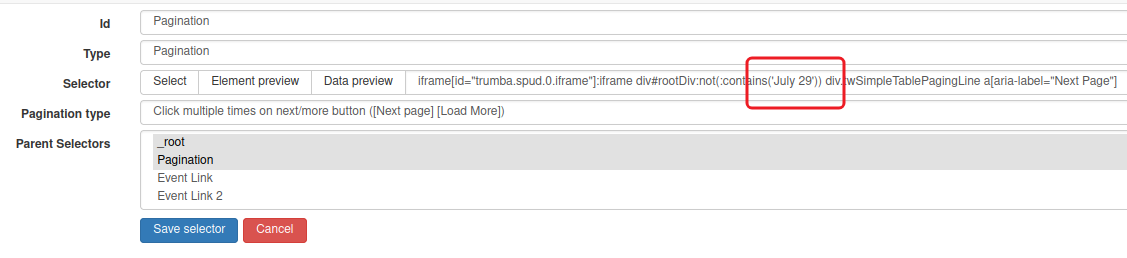
A stop condition has been added to the pagination selector; you can adjust it as required:

1 Like

Wow! Thank you very much @JanAp :slightly_smiling_face:
You're the best!

You take time to solved this problem. I try to run this on MS Edge and Opera but still pagination doesn't work same in Google Chrome.

By the way where is the specific HTML tag that this code ":not(:contains('July 29'))" targeted to?
I tried to inspect the HTML DOM but I doesn't see the specific tag.

:not(:contains('July 29')) is a jQuery, you can find an overview here on how to use it here Selectors | jQuery API Documentation

This specific setup stops matching the div#rootDiv element as soon as July 29 appears in the HTML, thus stopping the pagination.

1 Like