
Multiple Text Selector Change

I have scraped endless websites where I simply wanted to extract names of products, using the Text type, click multiple, and then selecting 1-2 names and then I would be done. I need these names to be in their own rows down a single column. But now the only option is to have the multiple records be in different columns in the same row or to be in one cell!

Is there anyway to do this same thing I used to do?

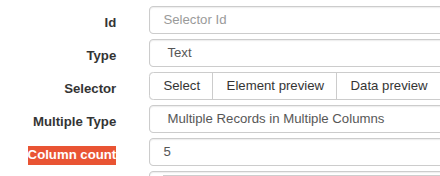
EDIT: Also it appears that when I do the Multiple Records in Multiple Columns it is only pulling 5 items? But if I select Multiple Records in One Column, it pulls all the items? This is really confusing me.
Hi,

Currently, the feature has been deprecated, but the same output can still be achieved using an alternative method.

To have the items as separate records, first select the attribute elements using an Element selector, which can be set as 'Multiple', and then create the Element Attribute selector as a child selector to the Element selector with the configuration 'first record only'.

Here is a generic example for reference:

{"_id":"webscraper-mutilple","startUrl":["https://webscraper.io/"],"selectors":[{"elementLimit":0,"id":"element","multiple":true,"parentSelectors":["_root"],"scroll":false,"selector":"a.menuitm","type":"SelectorElement"},{"extractAttribute":"href","id":"att","multiple":false,"multipleType":"singleColumn","parentSelectors":["element"],"selector":"_parent_","type":"SelectorElementAttribute"}]}

Regarding the other question, you can increase the column count to show the required number of columns

image

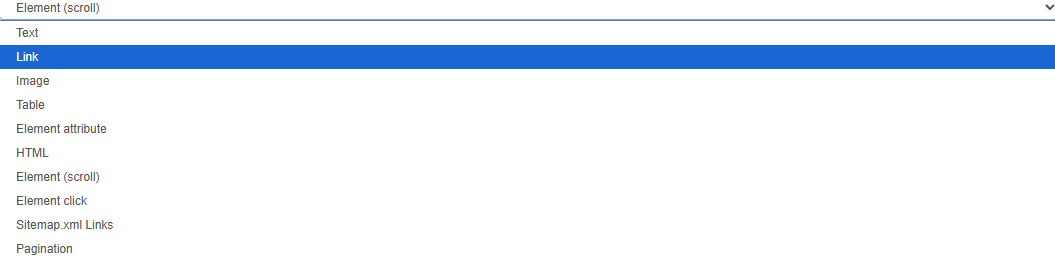
Thank you for the reply! Can you help me understand which Element selector I should make the parent? Do I then have to select the entire group of items with that selector? Then inside that pick Element Attribute and then select all of the names? I do not see Element by itself as an option. Thank you!

You have to select Element (scroll)

Please import the example sitemap from my previous message.