
I'm a bit new to this, so forgive my inexperience.
I'm trying to scrape all images for multiple products. I'm able to tell the scraper to navigate to each product and scrape the first image. The issue I'm having is selecting the next image on the page.
The site has 3 sizes for each image:
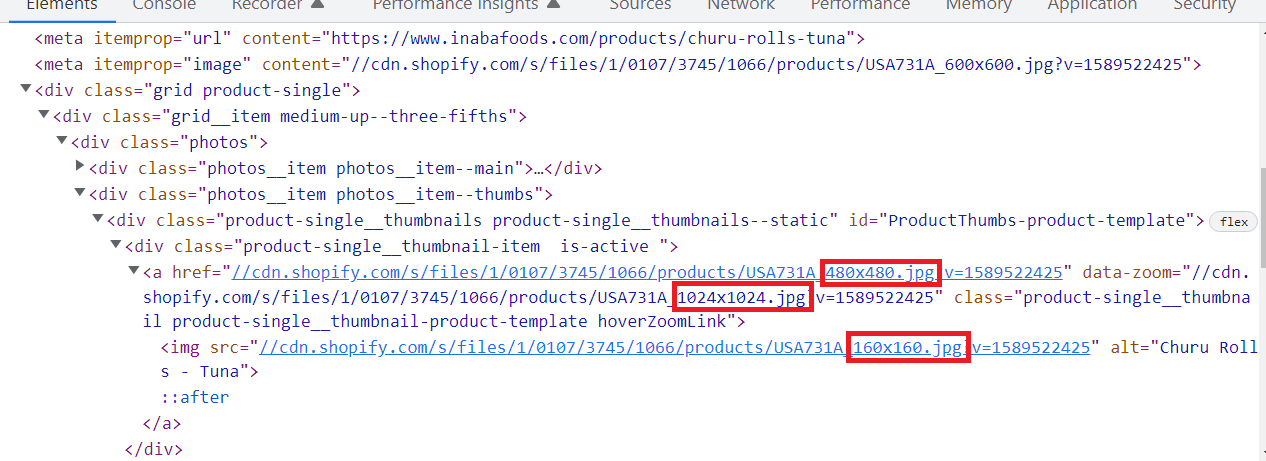
I need the full size image (1024x1024). The only way I know how to access is is by clicking on the thumbnail image and then clicking on the medium size image which expands to the full size. That's what I did to successfully scrape the first image.
I tried using the 'Element Click' to select the second image thumbnail but it selects the specific image link for the product I used to setup the scraper. So the results I'm getting is both links for just 1 product and duplicate links for the other.
Url: Churu Rolls – Premium quality pet food for your beloved pet friends
Sitemap:
{"_id":"churu-rolls","startUrl":["https://www.inabafoods.com/collections/churu-rolls"],"selectors":[{"id":"each-product","parentSelectors":["_root"],"type":"SelectorLink","selector":"a.product-card","multiple":true,"delay":0},{"id":"product-name","parentSelectors":["each-product"],"type":"SelectorText","selector":"h1","multiple":false,"delay":0,"regex":""},{"id":"expand-image-1","parentSelectors":["each-product"],"type":"SelectorElementClick","clickElementSelector":"img#ProductPhotoImg-product-template","clickElementUniquenessType":"uniqueText","clickType":"clickOnce","delay":2000,"discardInitialElements":"do-not-discard","multiple":false,"selector":"img#ProductPhotoImg-product-template"},{"id":"image-link-1","parentSelectors":["each-product"],"type":"SelectorImage","selector":"img.product-modal__image","multiple":false,"delay":0},{"id":"go-back","parentSelectors":["each-product"],"type":"SelectorElementClick","clickElementSelector":"div.modal__inner","clickElementUniquenessType":"uniqueText","clickType":"clickOnce","delay":2000,"discardInitialElements":"do-not-discard","multiple":false,"selector":"div.modal__inner"},{"id":"select-next-thumbnail","parentSelectors":["each-product"],"type":"SelectorElementClick","clickElementSelector":"[data-zoom='//cdn.shopify.com/s/files/1/0107/3745/1066/products/USA731A_back_1024x1024.jpg?v=1589522425'] img","clickElementUniquenessType":"uniqueText","clickType":"clickOnce","delay":2000,"discardInitialElements":"do-not-discard","multiple":false,"selector":"[data-zoom='//cdn.shopify.com/s/files/1/0107/3745/1066/products/USA731A_back_1024x1024.jpg?v=1589522425'] img"},{"id":"expand-image-2","parentSelectors":["each-product"],"type":"SelectorElementClick","clickElementSelector":"img#ProductPhotoImg-product-template","clickElementUniquenessType":"uniqueText","clickType":"clickOnce","delay":2000,"discardInitialElements":"do-not-discard","multiple":false,"selector":"img#ProductPhotoImg-product-template"},{"id":"image-link-2","parentSelectors":["each-product"],"type":"SelectorImage","selector":"img.product-modal__image","multiple":false,"delay":0}]}