
Click once element

I'm trying to learn how to use the click once element on a webpage. I assume that it works to uncover data that could be held in a dropdown element, once clicked reveals the data which is then captured.

For example -

On the above page the EAN field needs to be clicked once before the dropdown is revealed and data can be scraped. What's the correct configuration within the browser based scraper to achieve this?

1 Like

Hi,

I would recommend keeping sitemaps as simple as possible. In this case, it is possible to scrape the EAN without a click. You can check that by copying the EAN, refreshing the page, and searching the HTML for the EAN.

Try the selector #tab-1-1

Thanks. I want to use the same method for capturing the brand name.

For example, this link: Specialite Local - Dutch Apple Cake (12's) - Auguste Noel Ltd

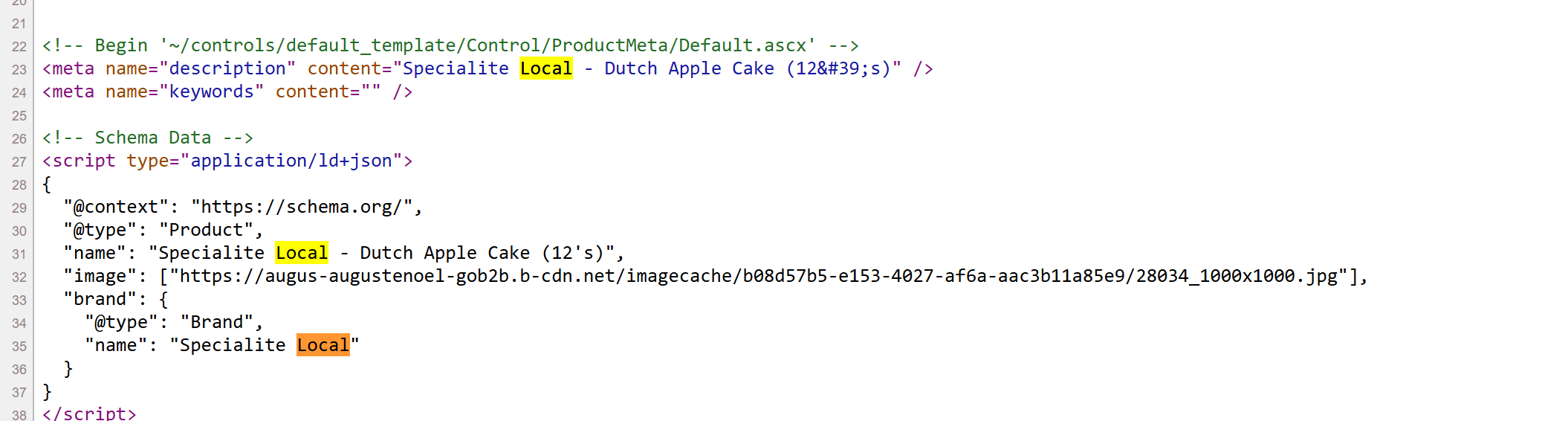
I want to get the brand name (which isn't actually visible on the page, but it's in the HTML). How do I know whcih element to enter in the selector in this case?

Just following up here to something that might be related. This URL has tabs for various data that can only be captured on a click of that tab which then reveals the data. Public

What's the best approach in getting data from these tabs? I couldn't find a clear element in the HTML for this one by matching up some of the phrases.

You can match the script containing the Brand with a text selector: script[type="application/ld+json"]:contains('Brand')

However, you will have to refine the data in the data output to isolate the Brand.

The bidfooddirect website cannot be accessed without a login.