
Can't scrape all records on all pages

Trying to scrape this site:
https://www.egbc.ca/Member-Directories/Membership-Directory?c=vancouver&ps=100

There are 77 pages total when 100 rows are selected to be displayed on each page.
Each page has a table with 100 rows of records, each with typical fields: last name, first name, company, etc
I'm trying to capture all the records for all 77 pages of 100 rows each in a CSV file
I seem to be getting all the data broken apart, one field per row, instead of all the fields of the same record on the same row in my CSV file.

The selectors I've chosen are here:
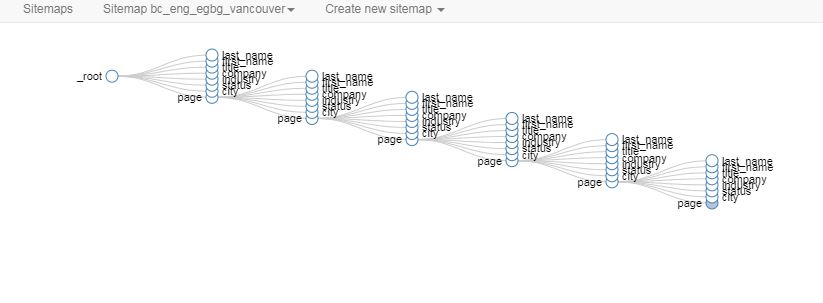

Graph is here:
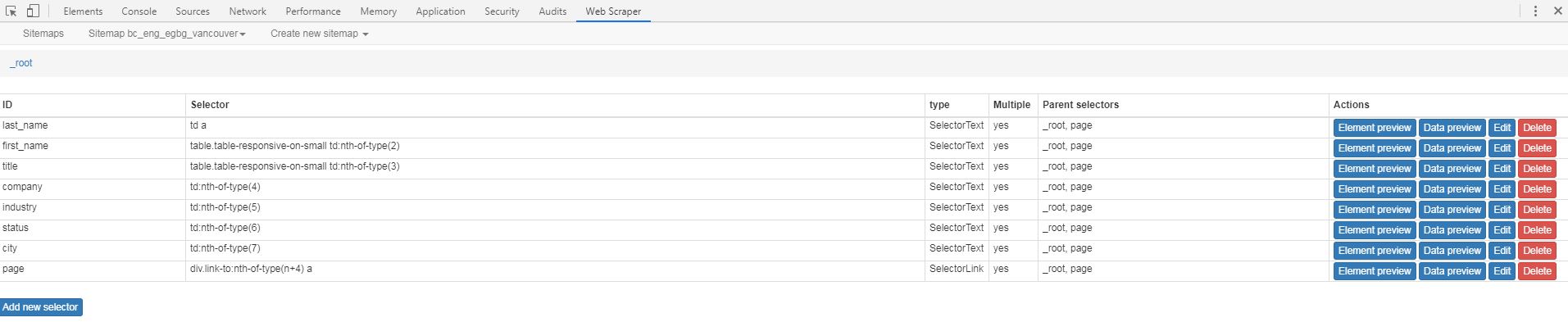
I thought that this might be because I should be using elements and element attributes but when I chose a row as an element so I made a new sitemap with elements and tried using element attributes to select the fields of the record but the software does not allow me to select fields as element attributes.

Also, what is required to cover EVERY PAGE? sometimes when I select multiple page elements, it covers all 77 pages, but other times it only selects the page numbers shown on the page (which is 5 in this case).

I've watched the tutorial videos on web scraper website and also this great one:


but I'm still doing something wrong.

Any help greatly appreciated!

You over complicated this scrape by treating every page using a link selector.

Here is a fix

{"_id":"aaa-membership-directory-webscraper-forum","startUrl":["https://www.egbc.ca/Member-Directories/Membership-Directory?c=vancouver&ps=100&p=[1-77]"],"selectors":[{"id":"TableSelect","type":"SelectorTable","parentSelectors":["_root"],"selector":"table.table-responsive-on-small","multiple":true,"columns":[{"header":"Last Name","name":"Last Name","extract":true},{"header":"Given Name","name":"Given Name","extract":true},{"header":"Designation","name":"Designation","extract":true},{"header":"Company","name":"Company","extract":true},{"header":"Industry","name":"Industry","extract":true},{"header":"Status","name":"Status","extract":true},{"header":"City","name":"City","extract":true}],"delay":0,"tableDataRowSelector":"tbody tr","tableHeaderRowSelector":"thead tr"}]}

Hi bretfeig, Thanks for that!

I'm a newbie, can you tell me where to go to understand the syntax of what you just wrote?

You're going to copy that and paste it into Webscraper on the "import site-map scree"

I used a dynamic URL (ie the [1-70] that tells webscraper to scrape every page in that range.
Then I used a simple table selector to grab the data

Does that answer your question? If not let me know what you'd like an explanation for

Oh great! OK, Let me try that.Thanks so much! I'll let you know how it goes.

Worked perfectly! Thanks for awesome help Bretfeig! :smiley: