Scraping from subsubpage

Hi JanAp,
I managed to open https://webscraper.io/ and I have below a toolbar, starting with:
Elements - Console - Sources - Network - Memory - etc... - Web Scraper (which I selected)

Where do I need to copy and paste the sitemap which you have sent?
Because I do not understand where is the webscraper extension :frowning

Still my unexperiency

Maybe I manage, I now understood that your long sentence is info of the steps in Webscraper.

I managed to get from the 1st page:

listing-link - listing-link-href
names - url's

but which code do I need to import as a Sitemap to get also the addresses from the sub-sub url?

Do I do something wrong in the webscraper?

Hi, all you need to do is click 'Create new sitemap' -> 'Import sitemap' and copy the code I posted earlier. When that is done, click on Sitemap -> Scrape.

YES!! It works perfect !!

I forgot to ask if the phone number and the website-url of the dentist can also be scraped together. Would you mind to add these fields to your previous link. I am VERY thankful

And also the postcode !!

It seems that when you click in the 2nd page (subpage) on the address, you get a popup with the whole address including the postalcode, phone number and their url. I hope you can and will add it to the previous script. Thank you so much in advance !!

Dear JanAp,

Can I do anything for you ?
I am so pleased that you are willing to help. It is so important for me.

Please let me know.
Thank you !!
David

Hi, sure, I can help you with that. To open the pop-up, I added the 'contact-information-click' selector to the sitemap:

{"_id":"zorgkaartnederland","startUrl":["https://www.zorgkaartnederland.nl/tandarts/pagina[1-358]"],"selectors":[{"id":"listing-link","linkType":"linkFromHref","multiple":true,"parentSelectors":["_root"],"selector":"a.filter-result__name","type":"SelectorLink"},{"id":"address-link","linkType":"linkFromHref","multiple":true,"parentSelectors":["listing-link"],"selector":"p:contains(\"is werkzaam bij:\") + [class=\"filter-results\"] .filter-result-content__body a","type":"SelectorLink"},{"clickActionType":"real","clickElementSelector":"[class*=\"modal-address-toggle\"]","clickElementUniquenessType":"uniqueCSSSelector","clickType":"clickOnce","delay":1000,"discardInitialElements":"do-not-discard","id":"contact-information-click","multiple":false,"parentSelectors":["address-link"],"selector":"_parent_","type":"SelectorElementClick"},{"id":"address","multiple":false,"parentSelectors":["address-link"],"regex":"","selector":"address","type":"SelectorText"},{"id":"phone","multiple":false,"parentSelectors":["address-link"],"regex":"","selector":".align-items-center a.underline","type":"SelectorText"},{"id":"website","multiple":false,"parentSelectors":["address-link"],"regex":"","selector":".flex-fill a.underline","type":"SelectorText"}]}

Hi JanAp,

Thank you so much!!

In the meantime I was busy to get the same, because I do not always want to be depended.
I managed myself in another way, without opening the popup, but your result is much better.

I am really very thankful for your help.
Would like to get something for your help? Please inform me.

Warm regards,
David

Hi, David! I am happy to help. If you have a minute, you are welcome to leave a review for the extension in the Chrome store!

Sure, but please help me where and how.
I am also unexperienced in this

And I will do

There should be a 'Write a review' button where the reviews are listed.

1 Like

Hi JanAp, yesterday I clicked on that screen but couldnot find that button :(.

Can you help me more wirh it. I love to write positive about your help

Unfortunately I still cannot find it :frowning:
I would so much thank you in a review !!

Hi JanAp,
I hope you are doing well!

It has been a long time ago that you helped me.

I managed several times to scrape a specialism from the
https://www.zorgkaartnederland.nl site.

But I do not succeed to get the adresses with website and phonenumber, which are more the 1 level deep, from the url:

I Used the following Sitemap JSON but I do not get the complete addresses with their website and phone number:
{"_id":"zorgkaartnederlandESTHETISCH","startUrl":["https://www.zorgkaartnederland.nl/ esthetisch-medisch-centrum/pagina[1-16]"],"selectors":[{"id":"listing-link","parentSelectors":["_root"],"type":"SelectorLink","selector":"a.filter-result__name","multiple":true,"linkType":"linkFromHref"},{"id":"address-link","parentSelectors":["listing-link"],"type":"SelectorLink","selector":"p:contains("is werkzaam bij:") + [class="filter-results"] .filter-result-content__body a","multiple":true,"linkType":"linkFromHref"},{"id":"contact-information-click","parentSelectors":["address-link"],"type":"SelectorElementClick","clickActionType":"real","clickElementSelector":"[class*="modal-address-toggle"]","clickElementUniquenessType":"uniqueCSSSelector","clickType":"clickOnce","delay":1000,"discardInitialElements":"do-not-discard","multiple":false,"selector":"parent"},{"id":"address","parentSelectors":["address-link"],"type":"SelectorText","selector":"address","multiple":false,"regex":""},{"id":"phone","parentSelectors":["address-link"],"type":"SelectorText","selector":".align-items-center a.underline","multiple":false,"regex":""},{"id":"website","parentSelectors":["address-link"],"type":"SelectorText","selector":".flex-fill a.underline","multiple":false,"regex":""}]}

Would you please help me again?

Thank you so much in advance.
David

Hi, please post the sitemap as Preformatted text otherwise the JSON is broken.

code

Hi JanAp,
Unfortunately I am not a professional ;(
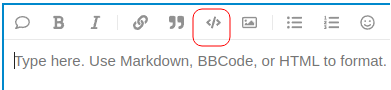
How can I post the sitemap as preformatted text? Would you help me step by step?

The next url is the subsite from which I want to get the adresses - 16 pages.
When click in one of the pages in one of the specialists, you can see "Toon contactgegevens".
When click on this link you get the wanted adress.

But I think you already understood :slight_smile:

Just click on the button highlighted in red

code