Problem with SelectorTable

Hallo,

I´m new to work with the Web Scraper, and i have a quit similar problem like sharkster with a table.

Website:

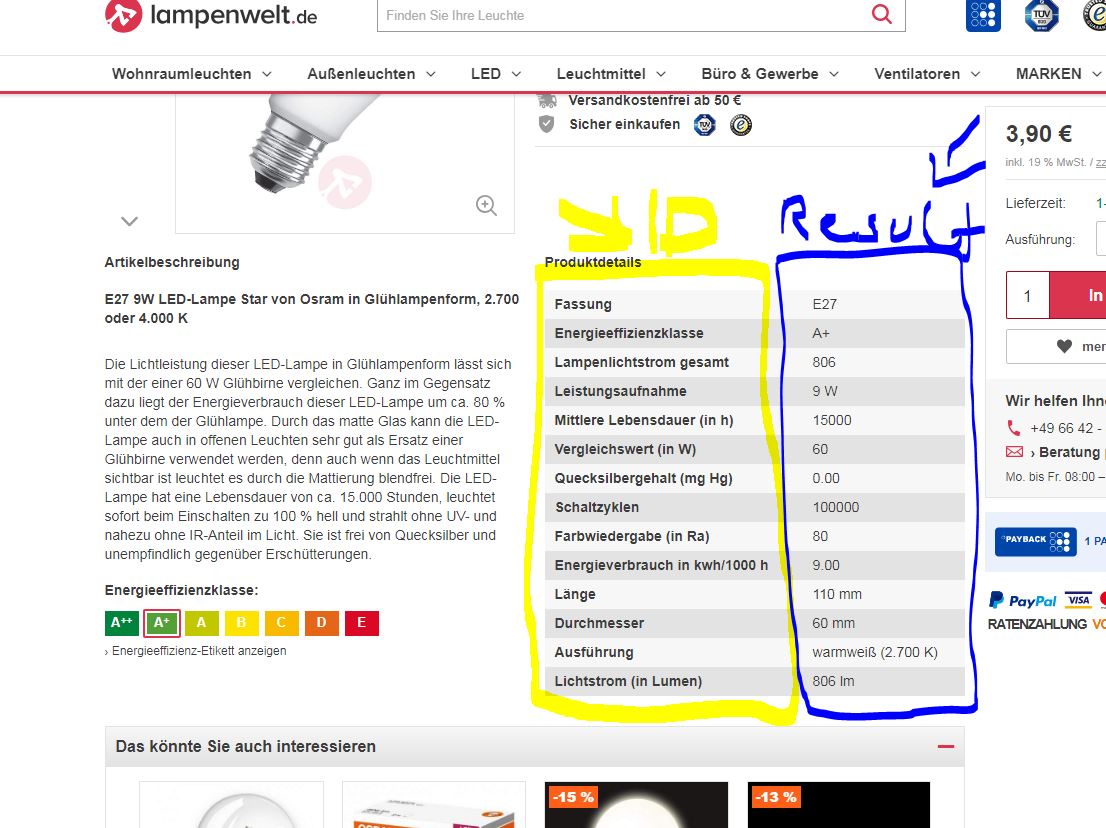
For example from this site I want to read out the table.

https://www.lampenwelt.de/e27-9w-led-lampe-star-in-gluehlampenform.html

I think the Problem ist that the row is on the left side, an the result is on the righte side.

This is my Web Scraper conf.

https://www.lampenwelt.de/e27-9w-led-lampe-star-in-gluehlampenform.html

{"_id":"lampenwelt-de","startUrl":["https://www.lampenwelt.de/leuchtmittel/?lw_illuminant_type=led-lampen"],"selectors":[{"id":"subcateg","type":"SelectorLink","selector":"a.subcategory","parentSelectors":["_root"],"multiple":true,"delay":0},{"id":"Produkte","type":"SelectorLink","selector":"ul.products-grid > li.item div.product-info > a","parentSelectors":["subcateg"],"multiple":true,"delay":0},{"id":"Datenblatt","type":"SelectorTable","selector":"table.toggle-content","parentSelectors":["Produkte"],"multiple":true,"columns":[{"header":"Fassung","name":"Fassung","extract":true},{"header":"E27","name":"E27","extract":true}],"delay":0,"tableDataRowSelector":"tr:nth-child(n) > td","tableHeaderRowSelector":"tr:nth-child(n) > th"}]}

Do have anyone of you an idea to solve it.?

Thanks a lot

Hallo,

is there realy nobody you could help me?

best regards
Christine

Hi!

I'll help, i'm currently at my dayjob. Stay tuned.

Thanks a lot, I'll stay tuned.

:grinning:

Well, with default Table selector you don't have flexibility you could have when using an Element selector. It's going to be updated in new version of WebScraper.

Try this one:
{"_id":"lampenwelt-de2","startUrl":["https://www.lampenwelt.de/leuchtmittel/?lw_illuminant_type=led-lampen"],"selectors":[{"id":"subcateg","type":"SelectorLink","selector":"a.subcategory","parentSelectors":["_root"],"multiple":true,"delay":0},{"id":"Produkte","type":"SelectorLink","selector":"ul.products-grid > li.item div.product-info > a","parentSelectors":["subcateg"],"multiple":true,"delay":0},{"id":"table","type":"SelectorElement","selector":"table.toggle-content tr","parentSelectors":["Produkte"],"multiple":true,"delay":0},{"id":"Detail","type":"SelectorText","selector":"th","parentSelectors":["table"],"multiple":false,"regex":"","delay":0},{"id":"Value","type":"SelectorText","selector":"td","parentSelectors":["table"],"multiple":false,"regex":"","delay":0}]}

Hi Icon,

thanks for your help.

But your solution doesn´t fit my problem.

That what is in the "Detail" I need at "Rows",
and waht is in "Value" in need as "Result".

I hope you will have another idea.

What do you think the new version of WebScraper will be updated?

Thanks a lot
Christine

Why not list each table elements as it's own text selector using the name (left side) as the name of that field?

Example (using first 2 rows of table)

{"_id":"lampenwelt-de","startUrl":["https://www.lampenwelt.de/leuchtmittel/?lw_illuminant_type=led-lampen"],"selectors":[{"id":"subcateg","type":"SelectorLink","selector":"a.subcategory","parentSelectors":["_root"],"multiple":true,"delay":0},{"id":"Produkte","type":"SelectorLink","selector":"ul.products-grid > li.item div.product-info > a","parentSelectors":["subcateg"],"multiple":true,"delay":0},{"id":"Lichtfarbe","type":"SelectorText","selector":"tr:contains('Lichtfarbe') td","parentSelectors":["Produkte"],"multiple":false,"regex":"","delay":0},{"id":"Fassung","type":"SelectorText","selector":"tr:contains('Fassung') td","parentSelectors":["Produkte"],"multiple":false,"regex":"","delay":0}]}

If I understood you, you meant just to rename the selectors, right?
You can go through your selectors, open Detail and Value, and rename them.

Or you want the results to go by columns?

Hi Bret,

that could work if there would be always the same ID in the similar row.

But in this case it won´t.

Thanks
Christine

Hi icon,

I need the left side of the table as the Column (ID), and the right side as result key.
.
.
Fassung ------ Energieeffizienzklasse ------ Lampenlichtstrom gesamt ------ Leistungsaufnahme


E27.................A+ .......................................806............................................ 9W

.
.

Fassung ------ Energieeffizienzklasse ------ Lampenlichtstrom gesamt ------ Leistungsaufnahme


E27.................A+ .......................................806............................................ 9W

I got you. Once I come home from work i'll try to help.

would be great if you could help.

Thanks a lot
Christine

Christine,

i've fixed your sitemap:
{"_id":"lampenwelt3","startUrl":["https://www.lampenwelt.de/leuchtmittel/?lw_illuminant_type=led-lampen"],"selectors":[{"id":"subcateg","type":"SelectorLink","selector":"a.subcategory","parentSelectors":["_root"],"multiple":true,"delay":0},{"id":"Produkte","type":"SelectorLink","selector":"ul.products-grid1 > li.item div.product-info > a","parentSelectors":["subcateg"],"multiple":true,"delay":0},{"id":"table","type":"SelectorElement","selector":"table.toggle-content tbody","parentSelectors":["Produkte"],"multiple":true,"delay":0},{"id":"Id1","type":"SelectorText","selector":"tr:nth-child(1) th","parentSelectors":["table"],"multiple":false,"regex":"","delay":0},{"id":"Res1","type":"SelectorText","selector":"tr:nth-child(1) td","parentSelectors":["table"],"multiple":false,"regex":"","delay":0},{"id":"id2","type":"SelectorText","selector":"tr:nth-child(2) th","parentSelectors":["table"],"multiple":false,"regex":"","delay":0},{"id":"res2","type":"SelectorText","selector":"tr:nth-child(2) td","parentSelectors":["table"],"multiple":false,"regex":"","delay":0},{"id":"id3","type":"SelectorText","selector":"tr:nth-child(3) th","parentSelectors":["table"],"multiple":false,"regex":"","delay":0},{"id":"res3","type":"SelectorText","selector":"tr:nth-child(3) td","parentSelectors":["table"],"multiple":false,"regex":"","delay":0},{"id":"id4","type":"SelectorText","selector":"tr:nth-child(4) th","parentSelectors":["table"],"multiple":false,"regex":"","delay":0},{"id":"res4","type":"SelectorText","selector":"tr:nth-child(4) td","parentSelectors":["table"],"multiple":false,"regex":"","delay":0},{"id":"id5","type":"SelectorText","selector":"tr:nth-child(5) th","parentSelectors":["table"],"multiple":false,"regex":"","delay":0},{"id":"res5","type":"SelectorText","selector":"tr:nth-child(5) td","parentSelectors":["table"],"multiple":false,"regex":"","delay":0},{"id":"id6","type":"SelectorText","selector":"tr:nth-child(6) th","parentSelectors":["table"],"multiple":false,"regex":"","delay":0},{"id":"res6","type":"SelectorText","selector":"tr:nth-child(6) td","parentSelectors":["table"],"multiple":false,"regex":"","delay":0},{"id":"id7","type":"SelectorText","selector":"tr:nth-child(7) th","parentSelectors":["table"],"multiple":false,"regex":"","delay":0},{"id":"res7","type":"SelectorText","selector":"tr:nth-child(7) td","parentSelectors":["table"],"multiple":false,"regex":"","delay":0},{"id":"id8","type":"SelectorText","selector":"tr:nth-child(8) th","parentSelectors":["table"],"multiple":false,"regex":"","delay":0},{"id":"res8","type":"SelectorText","selector":"tr:nth-child(8) td","parentSelectors":["table"],"multiple":false,"regex":"","delay":0},{"id":"id9","type":"SelectorText","selector":"tr:nth-child(9) th","parentSelectors":["table"],"multiple":false,"regex":"","delay":0},{"id":"res9","type":"SelectorText","selector":"tr:nth-child(9) td","parentSelectors":["table"],"multiple":false,"regex":"","delay":0},{"id":"id10","type":"SelectorText","selector":"tr:nth-child(10) th","parentSelectors":["table"],"multiple":false,"regex":"","delay":0},{"id":"res10","type":"SelectorText","selector":"tr:nth-child(10) td","parentSelectors":["table"],"multiple":false,"regex":"","delay":0},{"id":"id11","type":"SelectorText","selector":"tr:nth-child(11) th","parentSelectors":["table"],"multiple":false,"regex":"","delay":0},{"id":"res11","type":"SelectorText","selector":"tr:nth-child(11) td","parentSelectors":["table"],"multiple":false,"regex":"","delay":0},{"id":"id12","type":"SelectorText","selector":"tr:nth-child(12) th","parentSelectors":["table"],"multiple":false,"regex":"","delay":0},{"id":"res12","type":"SelectorText","selector":"tr:nth-child(12) td","parentSelectors":["table"],"multiple":false,"regex":"","delay":0},{"id":"id13","type":"SelectorText","selector":"tr:nth-child(13) th","parentSelectors":["table"],"multiple":false,"regex":"","delay":0},{"id":"res13","type":"SelectorText","selector":"tr:nth-child(13) td","parentSelectors":["table"],"multiple":false,"regex":"","delay":0},{"id":"id14","type":"SelectorText","selector":"tr:nth-child(14) th","parentSelectors":["table"],"multiple":false,"regex":"","delay":0},{"id":"res14","type":"SelectorText","selector":"tr:nth-child(14) td","parentSelectors":["table"],"multiple":false,"regex":"","delay":0}]}

It will list resulting parameters into single line, i think it's much more handy. Let me know if you don't like it, i'll change it to one you mentioned.

1 Like

Hi icon,

thank´s for your great support.

This will help, but I have to get the result of ID1 "Material" as "Result1" and so on, and all manually.

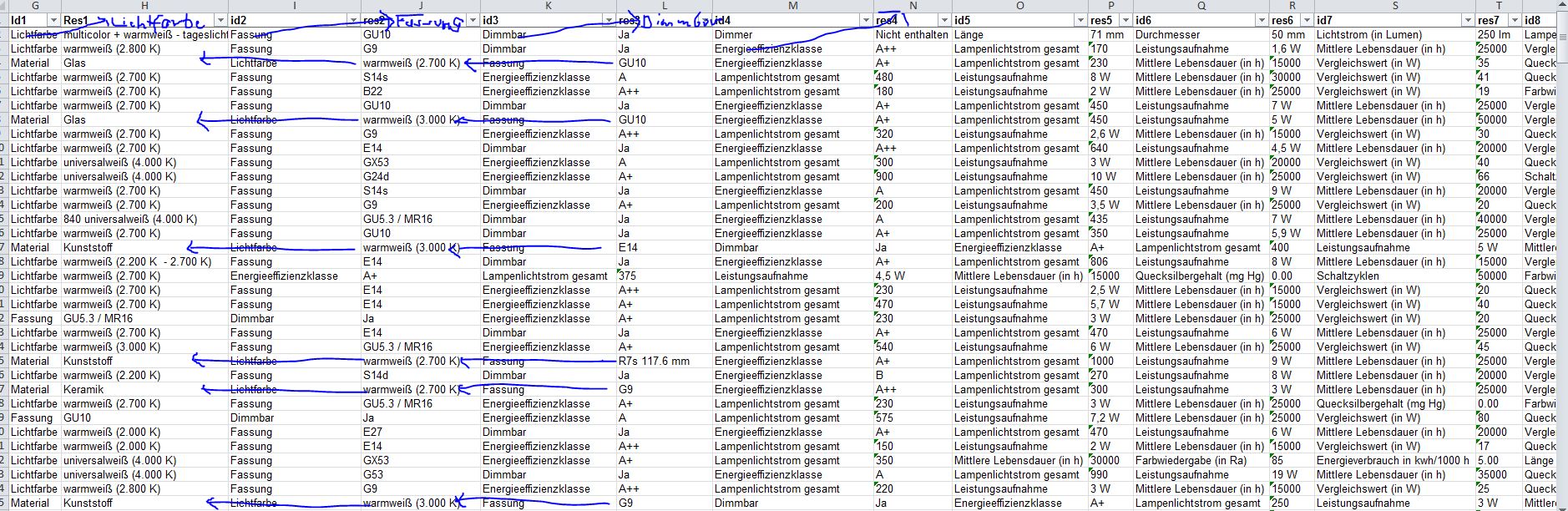
Also the problem ist that every product has his results in different culumns like you can see on the picture.

I think there will be no solution for that case.

best regards
Christine

You can still use Excel Index/Match functions to re-order the results the way you want, as it easier than using JQuery extension to re-order table on website.

1 Like